

Tesla Supercomputer uses up to 960 parallel processing cores
When talking about supercomputers, the images that come to mind are those of massive computer systems with hundreds or thousands of individual CPUs taking up huge rooms and requiring millions to build and operate. Those mental images are correct for most supercomputers.
NVIDIA is looking to change the way people thing about supercomputing with the introduction of its new Tesla Personal Supercomputer. NVIDIA claims that its GPU-based Tesla Supercomputer is capable of delivering the computing power of a cluster at 1/100th of the price.
Tesla Supercomputers can be purchased for under $10,000 and offer 250 times the processing power of normal desktop workstations. Despite the massive processing power offered by the Tesla system it is housed in a standard desktop form factor system.
Microsoft Technical Fellow, Burton smith said in a statement, "We’ve all heard ‘desktop supercomputer’ claims in the past, but this time it’s for real. NVIDIA and its partners will be delivering outstanding performance and broad applicability to the mainstream marketplace. Heterogeneous computing, where GPUs work in tandem with CPUs, is what makes such a breakthrough possible."
The Tesla Supercomputer is based on NVIDIA's CUDA architecture allowing the system to be programmed in the C language. Up to 960 parallel processing cores can be placed inside the system. NVIDIA claims that Tesla Supercomputers are in use in major research environments like MIT, Cambridge and others.
Antonio Julio from Dell said in a statement, "Dell has led the workstation category for almost a decade and GPU computing represents a massive leap forward in performance that will bring supercomputer power to the masses,” said Antonio Julio, director, Dell Product Group. “The Dell Precision R5400 and T7400 will allow the scientific community to harness the capabilities of the NVIDIA Tesla C1060 GPU with up to two teraflops of computational power.”
NVIDIA announced its Tesla Personal Supercomputer days after the DOE announced its Jaguar supercomputer had reached record setting levels of performance.
Rabu, 26 November 2008
NVIDIA Launches Tesla Supercomputer
Jumat, 14 November 2008
Windows 7 Features Revealed


Getting behind the wheel of Windows 7 reveals many changes, some minor, others larger
Microsoft has been very secretive about Windows 7. While it has let leak scant details about how touch functionality will play a critical role in the new OS, more information on how the new OS ticks, and its general feel have been scarce. The Windows team has been using a blog to let out information on the new product, but the stream has been more like a slow trickle, with few concrete explanations of features.
Curiosity about the new OS is unprecedented as many people view the new OS as Microsoft's attempt to atone for the shortcomings of Vista. While Vista was a solid OS with many new features and improvements, it failed to surpass the growth of the wildly popular Windows XP and also fell short in business adoption. Analysts blamed a variety of causes from poor support from hardware partners to factually ambiguous attack ads by Apple.
Regardless, the critical nature of the release to Microsoft cannot be overemphasized.
Now for the first time, a large list of features from Windows 7 has seen the light of day, following the leak of some features a couple days ago. The biggest new feature is the taskbar overhaul. The new taskbar looks foreign indeed with no text. It is filled with icons for easy program selection. Also new to the taskbar is the option to access "jump lists" with a quick right click. For example, right-clicking the Windows Media Player icon allows you to access playlists without having to open the application or waste time fiddling with menus. Finally, hovering over items on the taskbar generates helpful previews.
When you click the desktop, all windows go transparent offering you a free view. This is helpful to glance at gadgets, which have been moved from Vista's sidebar to a fixture on the desktop. This will be helpful to laptops which have lower screen resolutions and can less afford to waste valuable screen space on a separate sidebar.
There's also a really intuitive new window scaling gimmick that you'd think would be the kind of thing that a certain smarmy Cupertino-competitor might cook up. The cool new feature expands windows which you drag up to the top of the screen, and shrinks them as you drag them down the screen. And if you want to tile multiple windows, drag them to the corner of the screen to shrink them to 50 percent, allowing easy 4x4 tiling. The feature is really neat for its seeming simplicity.
The system tray now only displays the items you select, and it’s been streamlined to be easier and more straightforward to configure. User Account Control, a bane of some less-experienced Vista users who were baffled by its pop ups, reappears in Windows 7, but has been streamlined and fine-tuned. This allows the user to specify by application the level of access, while offering less disruptive annoyance.
Multi-touch features were demoed on a HP TouchSmart PC in a bit more detail. The start menu expands to a large size when you're touching the screen. You can automatically scroll inside any window using your fingers. A large onscreen predictive keyboard is another easily accessible touch feature.
Multiple-monitor management has also been streamlined. Projector setup is now a hotkey-press away. Media Center has adopted a Zune-like look. It displays a new album art screensaver when you're listening to tunes.
As to those hoping for a lighter build, it looks like your dreams may come true. Windows 7 Chief Steve Sinofsky held up his "personal" laptop during the demo. It was running Windows 7 flawlessly on a 1 GHz processor netbook (probably using a VIA processor) with only 1 GB of RAM. It was running very smoothly, with over half the RAM free to use.
However, Microsoft is equally emphasizing power, with support for up to 256 CPUs.
For developers, the big news is the pre-release of the Windows 7 in the form of a API-complete pre-beta, offered to the lucky few. This should help out-the-gate hardware support to be improved from Vista's debut, a major priority for Microsoft.
In all, there's too much to sum up in fine detail, but suffice it to say Windows 7 is shaping up to look very good. Where Vista was, in opinion of some, bloated, Windows 7 offers a light frame scalable to high levels of performance. And for the daily user, as the popularity of the iPhone showed, the sharp looking and greatly overhauled user interface may be the killer app which makes Windows 7 a consumer hit and a must-have upgrade when its released in late 2009 or early 2010.
Windows 7 Benchmarks Part II: Some Second Opinions

Microsoft's new OS is shaping up nicely but numerous reports target some critical spots for improvement
Initial reaction to an early report that Microsoft's Windows 7 might share similar performance and compatibility issues with Windows Vista was mixed and heated. Some lamented the inability of running Vista adequately on netbooks or older work computers, while others pointed to the OS's track record.
Due to the strong response, it certainly seems worthwhile to dig into this topic and offer some second thoughts, as well as get some second opinions, to ascertain if InfoWorld's Randall Kennedy was off base, or possibly onto something when he called Windows 7 a "virtual twin of Vista when it comes to performance."
First, let's examine two other early reviews of the pre-Beta of the OS. These reviews come from the blogging staff of PC World and PC Pro, two publications which typically use and appreciate Windows, despite giving it criticism where criticism is due (though both also feature numerous columns from primary Mac and Linux users).
First of all, PC Pro echoes InfoWorld's sentiments to some extent, stating, "And the net effect? Surprisingly little. At this stage of development, over a year from release, Windows 7 looks almost identical to Vista."
However, the publications points out that many of the upgrades to the OS touted at the PDC and WinHEC -- such as the improved task bar and the improved SSD support -- were not yet supported. Thus it is very reasonable to believe that some at least minor performance improvements may be in store as well.
They also offer up an interesting observation, which at first seems to be a contradiction. They state, "Yet Windows 7 does already offer one compelling advantage over Vista: it’s fast. Both our senior pontificators were struck by how nimble Windows 7 feels after you’re used to its predecessor. As Tim Danton writes, 'Vista was never this nippy. You press on an icon and it leaps into action. . . . I can’t remember using any new OS that was this quick.'"
"Fast" they say? Didn't they just say that it came up short in their benchmarks, failing to improve upon Vista. The publication aptly points out that the user interface is what has been dramatically tweaked and supercharged. They point out that the average user doesn't care about benchmarks -- they judge the package by the performance (the wrapping). Improving this is something PC Pro calls an "inspired move". It may be something Apple realized some time ago with OS X, but then again, Apple always grossly underperformed against Windows in key sectors like business software, security, gaming, and the most important metric of all -- price.
PC World (carrying a ComputerWorld piece) offers a second perspective on this new OS which promises to add a zippier interface to Window's solid underlying layer. This publication again echoes the sentiments of the others, stating, "Microsoft would like you to believe that Windows 7 is going to be the next great desktop operating system. It's not."
While likening Windows 7’s relation to Vista to Windows 98 Second Edition's and Windows 98, this publication does soften the blow a bit by acknowledging that it is a significant improvement over Windows Vista. However, the author later goes on to say when he closes, "All things considered, I'd rather stick with my Linux desktops and Mac OS X."
However, another ComputerWorld reviewer, while agreeing with the repeated theme that base benchmarks are similar to Vista, says that this time Microsoft "gets it right". The author points out the dramatically improved (and less annoying) UAC feature. They also mention the improved networking support, and other significant improvements.
So there are a couple of second opinions -- one enthusiastic, one rather pessimistic. Wrapping up, let’s look at three key things: the merits of testing this early build, (briefly) whether Vista was as bad as some say, and lastly what Microsoft needs to do before Windows 7's release (or risk losing customers).
First, many will question why these veteran computer publications are choosing to test a pre-beta, essentially alpha software, when it’s obvious that performance in the finished product may be dramatically different. While the merits of such tests are certainly debatable, the fact that the Windows 7 release date is likely less than a year away does give an understandable justification for such tests. Further, criticism of Windows Vista's pre-betas closely mirrored the criticism of the finished product, as can be seen by perusing past reviews.
But how bad was Vista really? Honestly, Vista was a pretty good OS. The vast majority of DailyTech staff have at least one Vista machine in the house. While the OS certainly had its limitations, it brought dramatic improvements to the Windows GUIs and security. The OS's biggest problem, for the home user was something Microsoft can't be blamed for -- poor hardware partner support.
The one place where Windows Vista perhaps fell noticeably short was in business adoption. While it’s true every generation of Windows OS is met with groans and moans from the business community who say that they can't fit it on their older hardware and networks, Windows Vista pushed the memory, network, and processor use envelope even more than XP did. And while it brought a lot of compelling features to the table, this seriously hurt its business adoption.
This leads into a final point -- what can Windows 7 do to improve between now and its final release? Obviously, incorporating the missing features demoed at WinHEC and PDC is not only a must, but is a virtual certainty. Past that, though, Microsoft needs to ensure that hardware and software partners are holding up their end with compatibility. Again, these problems, mentioned in the original article are not problems from Microsoft, but they become Microsoft's headaches.
Finally, and most importantly, something has to be done to allow the OS to run leaner and use less memory and system resources. Otherwise Windows 7 will likely miss the boat on adoption in two key sectors -- netbooks and the business community. And this would be truly a shame, since Windows 7 looks to offer a number of tempting features.
Rabu, 12 November 2008
NVIDIA Meluncurkan 4GB Quadro FX 5800 Graphic Card
Nvidia sebagai raksasa pengembang Graphic card, meluncurkan sebuah fenomena terbaru dibidang komputasi, khususnya Graphic card. Perusahaan ternama tersebut menc iptakan ide 4GB graphic card seri Quadro FX yang selama ini diciptakan Khusus untuk Visualisasi 3D, Simulasi dan penghitungan energi dan juga Game yang membutuhkan kecepatan komputasi yang mumpun. Seri yang diciptakan adalah Quadro FX 5800 dikhususkan untuk pencinta game yang performa setara dengan Nvidia 9800GX2 2GB x2.Mendukung penuh Direct X 10.1 Multi-system dan Multi-
 Visualization dengan demikian Nvidia berharap banyak pada pengembang teknologi untuk kedepanya dapat menciptakan sebuah rumusan baru dibidang komputasi khususnya bagi kalangan gamer dan ilmuwan. saat ini sudah ada dan dijual dengan harga US$ 3,499.
Jumat, 07 November 2008
Pemrograman Robot melalui Mikrokontoler Basic Stamp
Kali ini saya akan sedikit memberi pengetahuan bagaimana cara memprogram robot yang berdasarkan mikrokontroler Basic Stamp. Mikrokontroler sendiri sebenarnya bukan hanya, namun juga Atmel Microcontroler ber-Id depan atxxxx sesuai namanya, Pic microcontroler yang biasanya menggunakan bahasa pemrograman C++ atau C dan lainya namun disamping itu kemampuan mikrokontroler berbeda satu sama lain contoh mikrokontroler Atmel sendiri dirancan untuk Advance programmer karena menggunakan ISP (In System Programming) yang membutuhkan dasar-dasar pemrograman yang harus dipelajari terlebih dahulu.Mikrokontroler Basic Stamp adalah yang paling banyak digunakan programmer kalangan Universitas ata para ilmuwan dari berbagi bidang ilmiah dan juga hobbyist.
pada kali ini saya menyertakan file latihan yaitu source code 
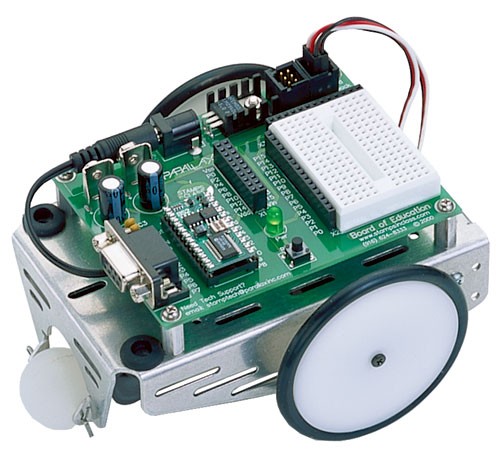
1. SOUT Serial Output (ke RxD pada PC com Port)
2. SIN Serial Input (dari TxD PC Com Port)
3. ATN attention (ke DTR PC Com Port)
4. VSS Ground ( Ke GND PC Com Port)
5-20. P0-P15 I/O Digital
21.VDD +5V DC I/O
22.RES Reset I/O
23.VSS Ground ( umum)
24.VIN +5.5-12V DC input
Cara memprogram Basic Stamp sangatlah mudah dan enak. anda akan menemui cara di era 80-an dengan menggunakan quick basic yang menggunakan Port COM di komputer.
Ini adalah Contoh program Untuk melakukan kalkulasi pada basic Stamp
jumlah. bs2
'Latihan menjumlahakan 2 bilangan
'Lab Robotics Lufti Robotic lab center
'{$STAMP BS2}------------------------- adalah jenis mikrokontoler yang akan diprogram
'{$PBASIC 2.5}--------------------------adalah jenis penggunaan bahasa versi yang diprogram
'jumlah.bs2
DEBUG "Berapa 2 + 13?"
DEBUG CR, "Jawabanya Ialah:"
PAUSE 2000
DEBUG CR, "betul jawabanya adalah"
DEBUG DEC 2+13
END
Program yang telah dijalankan diatas akan menjumlahkan 2 bilangan menjadi tipe data desimal.
Kode program yang lebih lengkap dapat anda download secara cuma-cuma di //www.parallax .com

Kamis, 06 November 2008
Trik-Trik Professional pemodelan di 3D Studio max 8

Kali ini saya akan memberi sedikit suatu pelajaran mengenai tekhnik pemodeln yang biasa dilakukan oleh para 3 dimensi designer setelah melalui proses pembuatan objek dan Effect nya.
1. Membuat Objek bergerak.
sebuah objek tadi sesuai dengan keinginan anda dan klik set keys untuk menetapkan key yang sudah di atur tadi kemudian klik play untuk menjalankan hasil animasi.untuk mendapatkan hasil sempurna saat rendering aktifkan radio button high quality video pada format video hasil render anda
2.Men-costumize objek (effect Gizmo).
Objek yang telah dibuat. klik create > helpers > athmospheric > spheregizmo pada menu bar. Buka subpanel Modify kemudian atur Radius=50 dan aktifkan Hemisphere.klik add pada rollout atmospheric & effects,atur agar inner color, menjadi merah , outer color menjadi warna putih, dan Smoke color menjadi warna hitam (terserah anda memakai warna apa saja). pada group colors.pilih Tendril untuk Flame type. beri nilai Stretch = 10 dan R
 egularity = 1.0 pada group Shape. atur kembali agar Flame Size menjadi tepat dengan memberi nila = 10, Flame Detail = 10, Density = 20,dan Samples = 100 pada Group Charatheristics.geser frame paling akhir dan aktifkan tombol Auto key. kembali lagi ke tahap sebelumnya ke Enviroments and Effects, beri nilai 200 untuk Phase dan 50 untuk Drift pada group Motion. kembali lagi ke Sphere Gizmo, lekatkan Gizmo pada Objek 3 dimensi yang anda buat menggunakan tombol select and link. jalankan animasi untuk melihat hasil sementara, jika belum berhasil mengeluarkan efek gizmo-nya, ulangi lagi karena latihan memerlukan sedikit waktu untuk mengulang. 1.2 salah satu contoh penggunaan effect superspray dan Gizmo
mungkin sampai saat ini saja yang munkin yang dapat saya berikan, namun pada kesempatan yang lain,saya akan memberikan lanjutan trik-trik yang lebih professionl lagi Selamat mencoba dan terus berlatih...!!!!

